Scarlette Script: A Handmade Seller’s Signature for Labels, Cards, and Packaging
The first time I opened Scarlette Script, I was sitting at my kitchen table with a stack of kraft-paper tags and a new wax seal kit I had ordered the week before. I had spent the morning testing different typefaces for a small batch of lavender soy candles I was preparing for a local market, and nothing felt right. The sans serifs were too stiff. The casual handwritten fonts looked a little too rough once printed at small sizes. I needed something that felt natural, elegant, and still distinctly handcrafted. That is when I loaded Scarlette Script and typed a simple word: “calm.” The ligatures kicked in, the letters linked together in a smooth, unhurried dance, and I knew I had found the voice for my product line.
The Visual Personality of Scarlette Script
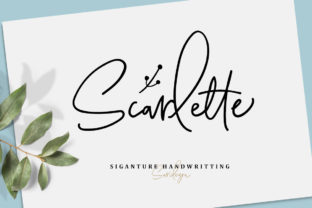
Scarlette Script is a natural signature script, the kind of typeface that looks like it was written with a fine pen on a quiet Sunday afternoon. It carries a warm, graceful personality without feeling overly formal or stiff. The letterforms have a gentle slant, with strokes that feel intentional and fluid. What makes this font stand out for makers is the inclusion of lots of ligatures—those connected letter pairs that give script fonts a polished, flowing appearance. When you type a word like “welcome” or “handmade,” the letters link together naturally, creating a result that feels custom-drawn rather than typed. As someone who produces physical goods, I find that this sense of authenticity translates directly onto the products my customers hold in their hands.
Beyond the script itself, Scarlette Script also includes a doodle font. This bonus set of decorative elements opens up a whole range of creative possibilities for logo marks, small accent graphics, and brand motifs. I have used the doodle font to create tiny floral corner accents for thank-you cards and simple line-art icons for product tags. For a handmade seller, having a script and a matching doodle set in one package is like getting a design system that is ready to work from day one.
Bringing Scarlette Script to Life on Labels and Packaging
One of the first real applications I tested was a candle label. I wanted the word “Lavender & Sage” to feel soft and botanical, and Scarlette Script delivered exactly that. Printed on a matte sticker sheet with a cream base, the script retained its fine details without losing legibility. The ligatures made the phrase look like a single, flowing brushstroke, which elevated the overall presentation of the candle. I paired the script with a clean sans serif font for the scent notes and weight details, and the contrast between the elegant headline and the simple supporting text created a balanced, professional look.
For packaging, I have used Scarlette Script on everything from small hang tags for soap bars to the front of muslin bags filled with dried flowers. The font shines at medium to large sizes, where the subtle variations in stroke thickness become visible. If you are printing on textured paper or kraft material, the natural character of the script holds up beautifully. I recommend testing a print sample before committing to a full batch, as the fine hairlines in the ligatures can become delicate on very rough surfaces. But on smooth or lightly textured paper, the results are stunning.
Wedding Invitations and Stationery That Feel Personal
If you design wedding invitations or greeting cards, Scarlette Script is a strong candidate for the primary display typeface. I created a mockup for a garden wedding invitation suite, using the script for the couple’s names and the phrase “together with their families.” The ligatures added a level of sophistication that made the invitation look like it had been hand-addressed by a calligrapher. For the body text, I used a simple serif font to keep the layout readable, reserving the script for the most important words. This approach works well because Scarlette Script is best used for short phrases, names, titles, and decorative wording rather than long paragraphs. The rhythm of the script is beautiful, but readability decreases when too many words are stacked in all-caps or at very small point sizes.
I also tested the font on a set of greeting cards for a small batch of birthday and thank-you designs. Printed on soft white cardstock with a digital press, the script gave each card a handmade feel without requiring actual hand lettering. For a seller who produces multiple card designs, this font offers consistency across the entire product line. Customers often comment that the cards look “special” or “personal,” and that reaction comes directly from the natural script aesthetic.
Printable Wall Art and Digital Templates
Printable wall art is another area where Scarlette Script performs well. I designed a series of single-word prints—“breathe,” “gather,” “home”—using the script as the focal point. The doodle font came in handy here as well, adding simple line-art borders that framed the text without overpowering it. For digital sellers, this font can be used in template previews, mockups, and listing images to convey a warm, approachable brand style. When I uploaded a preview of a farmhouse-style print to my shop, the script’s natural flow immediately caught the attention of customers looking for something that felt authentic rather than mass-produced.
One practical note for printable creators: Scarlette Script works well for titles and headings in digital planners, journal covers, and sticker sheets. If you are designing a set of weekly planner stickers, using the script for the days of the week adds a lovely handmade touch. Just be mindful of the size—keeping the point size above 18 for printed stickers helps maintain clarity. For digital use, such as on-screen planner templates, the script remains crisp and readable at slightly smaller sizes.
Cutting Machines, Stickers, and Physical Merchandise
For those of us using cutting machines like Cricut or Silhouette, Scarlette Script is a reliable choice for vinyl projects. I have used it to create tote bag designs, mug text, and small wall signs. The connected ligatures mean fewer individual pieces to weed, which saves time and reduces frustration. When I cut the word “cozy” in white vinyl for a set of mugs, the letters stayed connected perfectly, and the final result looked like a single smooth line. For shirt designs, the script works well for short phrases or names placed on the front or back. I recommend using a slightly bolder weight or increasing the stroke thickness in your design software if you are working with heat transfer vinyl on dark fabrics, as the fine details can become less visible on textured materials.
Sticker sheets benefit from Scarlette Script’s ligature-rich design as well. I created a set of small motivational stickers with words like “shine,” “hope,” and “joy” in the script, paired with simple doodle accents from the bonus font. The stickers printed cleanly on matte vinyl, and the fine lines held up during the cutting process without tearing. For sellers who produce sticker packs, this font offers a cohesive look across multiple designs while keeping production efficient.
Font Pairing and Practical Considerations
Scarlette Script pairs naturally with clean sans serif fonts, such as a simple geometric or humanist sans. The contrast between the flowing script and a neutral, unadorned sans serif creates a hierarchy that is easy to read and visually appealing. I have also paired it with a light, elegant serif for a more traditional look, especially on wedding stationery and formal packaging. Avoid pairing it with another elaborate script, as the result can become busy and hard to read. Stick to one script voice and let supporting fonts stay simple.
Before using Scarlette Script for physical products or digital downloads, check the included file formats and licensing. The font typically comes with OpenType features that allow you to access the ligatures and alternate characters through software like Adobe Illustrator, Affinity Designer, or even Cricut Design Space if you have the right setup. Multilingual support is available, which is helpful if you sell to international customers or create products in multiple languages. Always review the commercial license terms before selling items that use the font, whether you are producing printed goods, digital templates, or merchandise like mugs and shirts. Proper licensing ensures you can use the font confidently in your shop without any legal concerns.
Scarlette Script has become a staple in my design toolkit. It moves easily from candle labels to wedding invitations, from sticker sheets to tote bags, all while maintaining the same warm, handcrafted character. For makers who want their products to feel personal and intentional, this font offers a way to bring that signature touch to every item you create.